Every photography business has the same leak: inquiries come in and some of them just disappear. They land in your email inbox and get buried under other messages. They come through Instagram DMs and you forget to follow up. Someone calls during a shoot and you never write their details down.
The photographers who book consistently are not necessarily more talented or cheaper. They are the ones who respond first, follow up reliably, and never let a lead slip through the cracks. This guide shows you how to set that up in fstop so every inquiry is captured, tracked, and acted on.
1 Connect Your Website Form
The first step is making sure inquiries from your website land in fstop automatically. You have two options:
- Embed a fstop form — build a branded contact form in fstop's Form Builder, copy the code, and paste it on your website. Every submission creates a lead automatically.
- Use a webhook URL — keep your existing website form (Squarespace, Wix, WordPress, etc.) and point it at your fstop webhook URL. Submissions flow into fstop without changing anything on your site.
Either way, when someone fills out your contact form, their name, email, event date, event type, and message all show up in your Inquiries inbox instantly. No copy-pasting, no manual entry.
Which method should you pick? If you want full control over how your form looks and what fields it includes, use the Form Builder. If your website already has a form that matches your design and you do not want to change it, use the webhook. Both end up in the same place.
2 Review Incoming Inquiries
Open the Inquiries page to see every lead in one place. New inquiries appear at the top, and each one shows a summary: name, event type, event date, and when it came in.
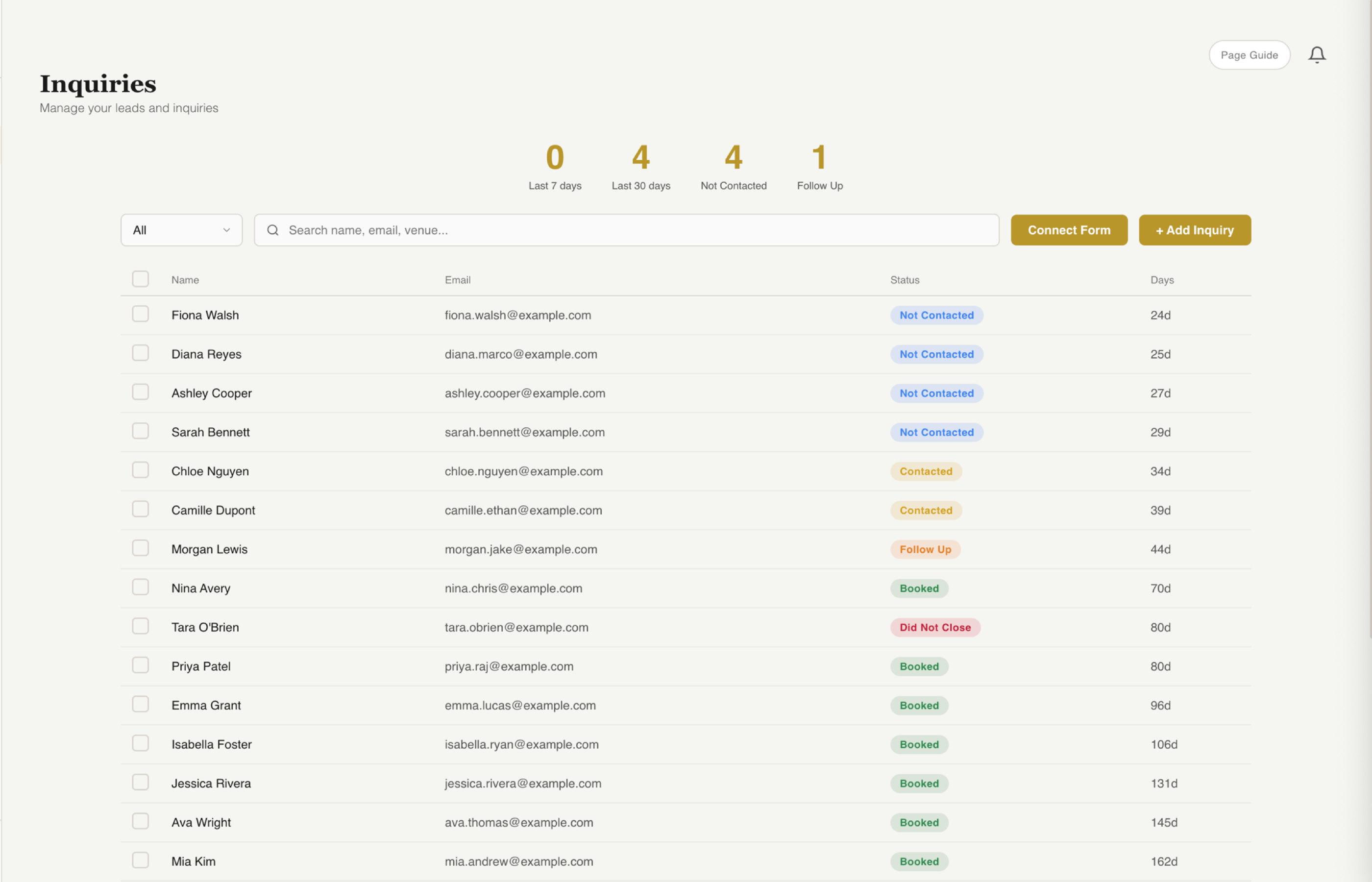
Every inquiry in one view. See who reached out, what they need, and where they stand in your pipeline.
Click on any inquiry to open the lead detail panel. This shows everything the client submitted:
- Full name, email, and phone number
- Event date and event type
- Venue, package interest, and budget (if your form collects these)
- Their full message
- Any custom fields from your form
- Activity history — every interaction logged in one timeline
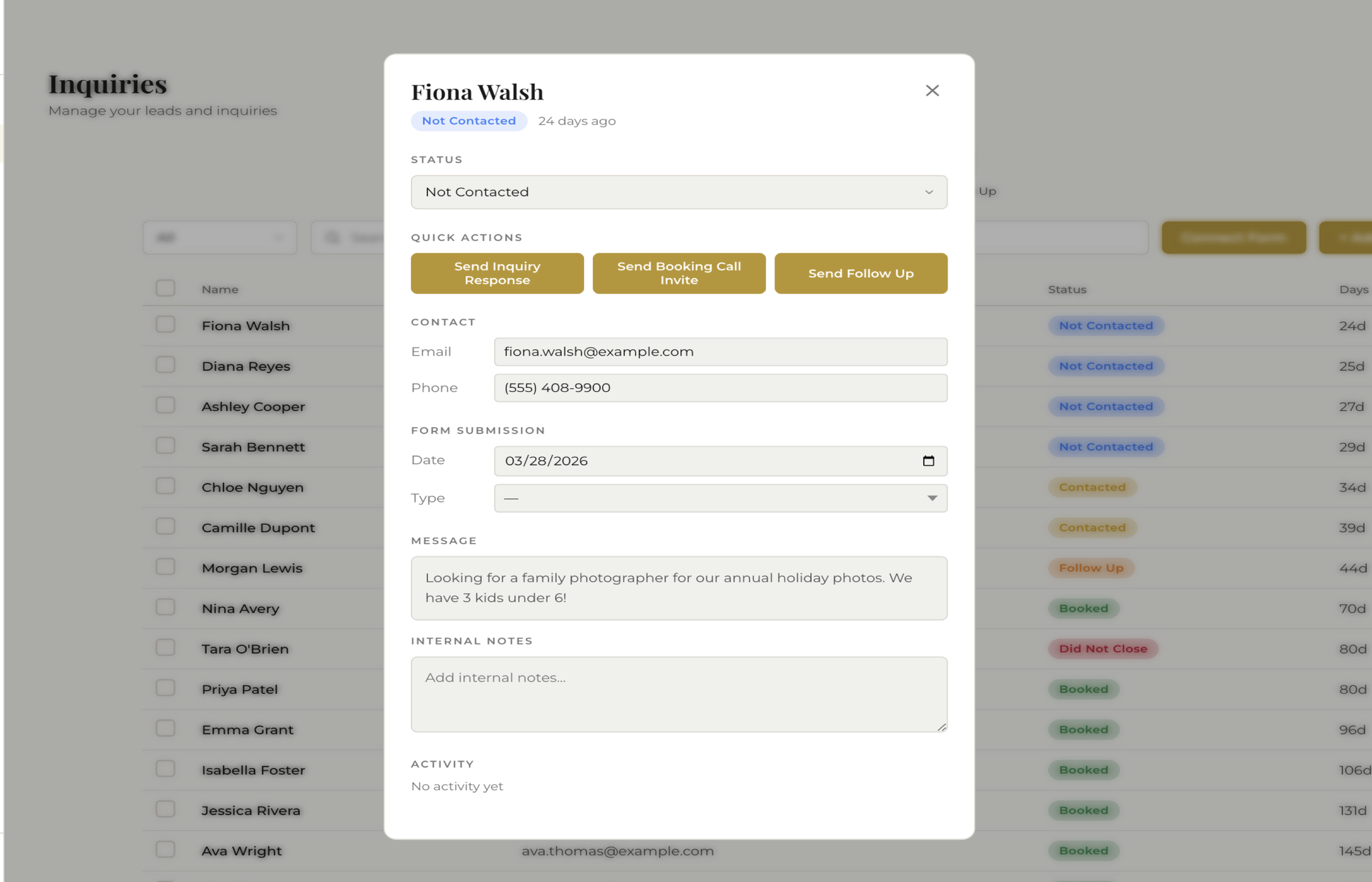
The lead detail panel shows everything the client submitted plus quick actions to respond.
From here you can send an email reply, move the lead to the next stage, convert them to a client, or archive the inquiry if it is not a fit.
3 Add Leads Manually
Not every lead comes through a website form. Phone calls, Instagram DMs, Facebook messages, referrals from past clients, conversations at bridal shows — these leads need to be tracked too.
Click Add Inquiry to open the manual entry form. Fill in whatever details you have — even just a name and email is enough to start. The lead enters your pipeline immediately.
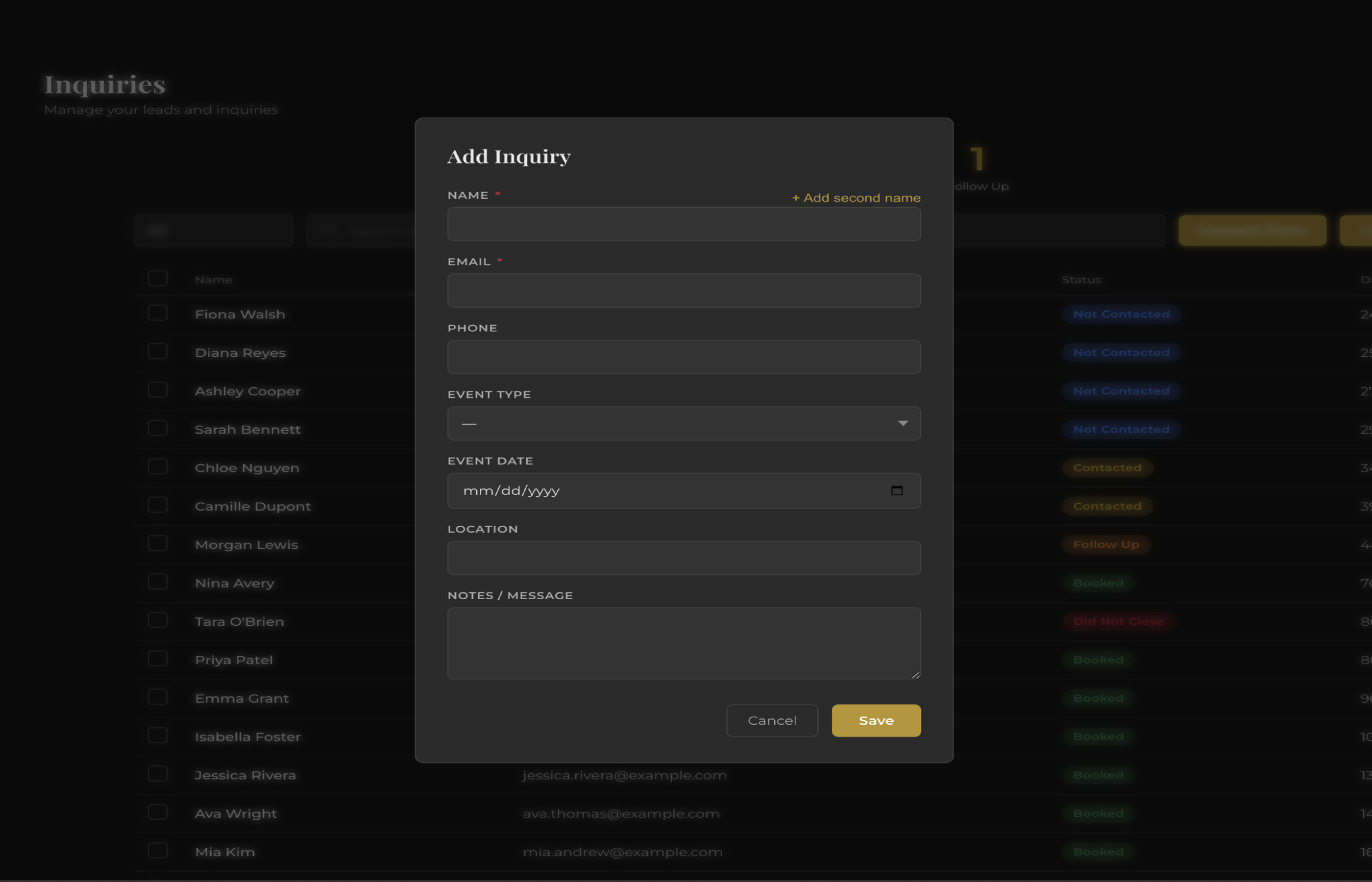
Quick-add any lead from phone calls, DMs, referrals, or bridal shows.
The rule: If someone expresses interest in hiring you, they go into fstop. It does not matter if they came through your website, called you, or stopped you at a coffee shop. If it is not in the system, it does not exist. This habit alone will win you more bookings than any marketing tactic.
4 Set Up Auto-Responses
Speed is the single biggest factor in booking rates. The photographer who responds in 5 minutes books more than the one who responds in 5 hours. But you cannot be glued to your inbox all day, and you definitely cannot respond instantly when you are on a shoot.
That is what automations are for. Set up an auto-response that fires the instant a new inquiry comes in. The client gets a professional, branded email within seconds:
- Personalized with their name and event details
- Sent from your connected Gmail (replies come back to you)
- Can include your pricing guide, portfolio link, or a link to book a consultation
- Lets the client know you received their inquiry and will follow up personally
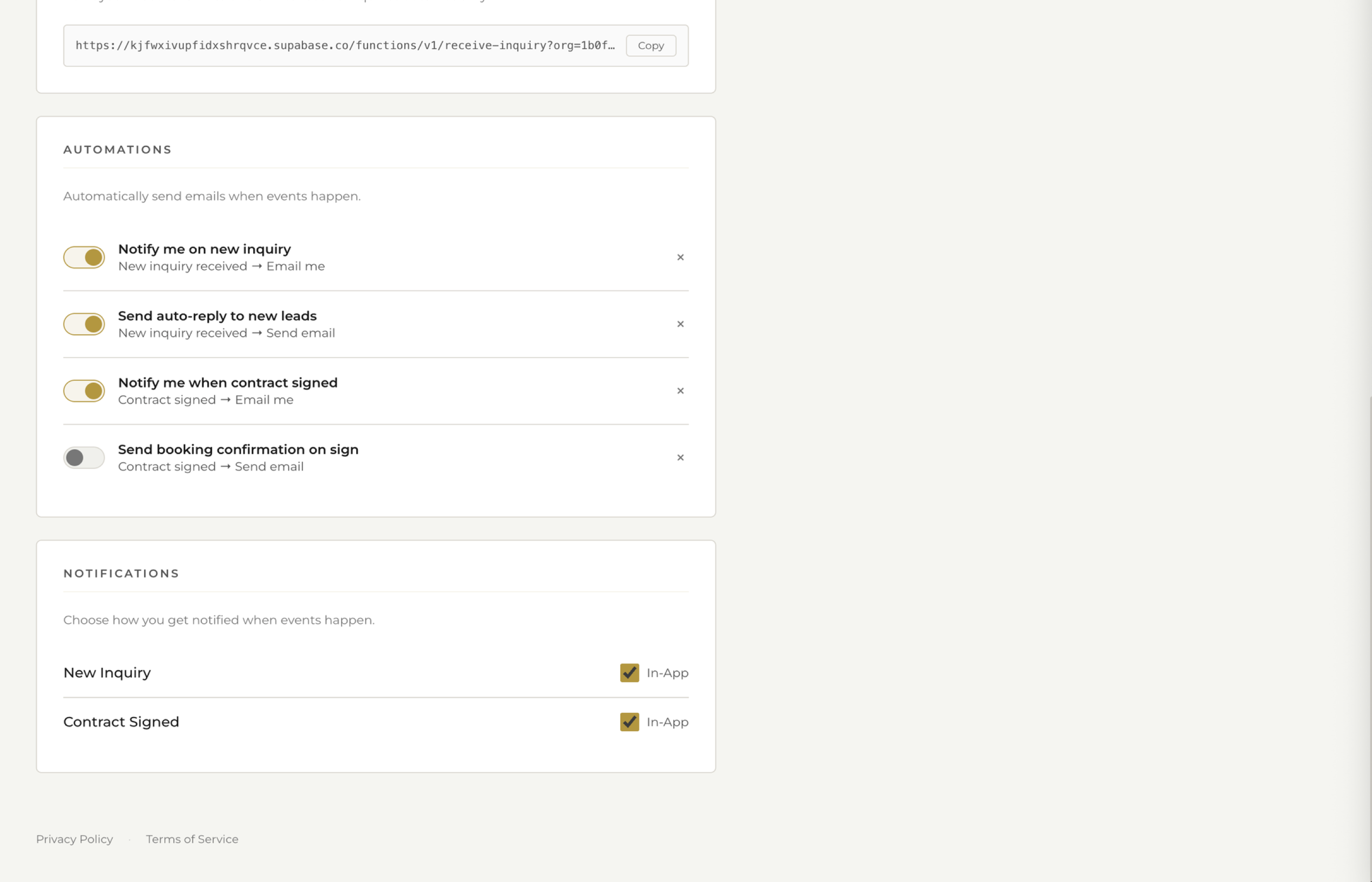
Auto-responses fire instantly when a new inquiry arrives. The client hears back in seconds, even when you are on a shoot.
This buys you time to send a personalized follow-up later while making a great first impression immediately. The client knows you are professional and responsive, which puts you ahead of every photographer who takes a day to reply.
5 Move Leads Through Your Pipeline
Every inquiry has a status that tracks where they are in your booking process. The default stages are:
- New — just came in, not yet contacted
- Contacted — you have sent a reply
- Meeting Scheduled — a consultation or call is on the calendar
- Proposal Sent — you have sent pricing or a package proposal
- Booked — they signed a contract and paid a deposit
As you interact with each lead, update their status. This gives you an instant overview of your entire pipeline: how many new leads need responses, how many meetings are coming up, how many proposals are waiting for a decision.
When a lead books, you convert them to a client. All their information carries over — no re-entering data. From there, you can send contracts, invoices, questionnaires, and timelines, all tied to the same record.
The Follow-Up System That Books More Clients
Most photographers lose bookings not because of price or talent, but because they do not follow up. Here is a simple system that works:
- Minute 1: Auto-response fires (handled by automations)
- Within 2 hours: Send a personalized email — reference something specific from their message, include your pricing if you did not already, suggest a time to chat
- Day 3: If no reply, follow up with a friendly check-in. "Just making sure this didn't get lost in your inbox"
- Day 7: Final follow-up. "Totally understand if the timing isn't right — just wanted to make sure you had everything you need"
Three follow-ups is not pushy. It is professional. Most clients are juggling a hundred wedding decisions and genuinely appreciate the reminder. The pipeline view in fstop makes it obvious which leads need follow-up so nothing falls through the cracks.
For more on this, read: How to Book More Photography Clients With Better Follow-Up.
Stop Losing Leads
Every inquiry captured, tracked, and followed up on. Set up your inquiry system in minutes.
Start Your Trial