If you're a photographer comparing tools in 2026, there's a good chance Pixieset and Fstop CRM have both come across your radar. They're both built for photographers. They both handle contracts and invoices. On the surface, they look like direct competitors.
But they're not. They come from completely different starting points, and understanding that difference is the key to picking the right tool for your business -- or deciding you need both.
Pixieset started as a gallery delivery and online storefront platform. Over the years, it has expanded into CRM territory by adding contracts, invoicing, questionnaires, and a client portal. Fstop CRM started on the opposite end: as a workflow-first CRM built by a working photographer, with the entire client lifecycle -- from first inquiry to final delivery -- as the foundation.
Same industry. Very different tools. Let's break it down honestly.
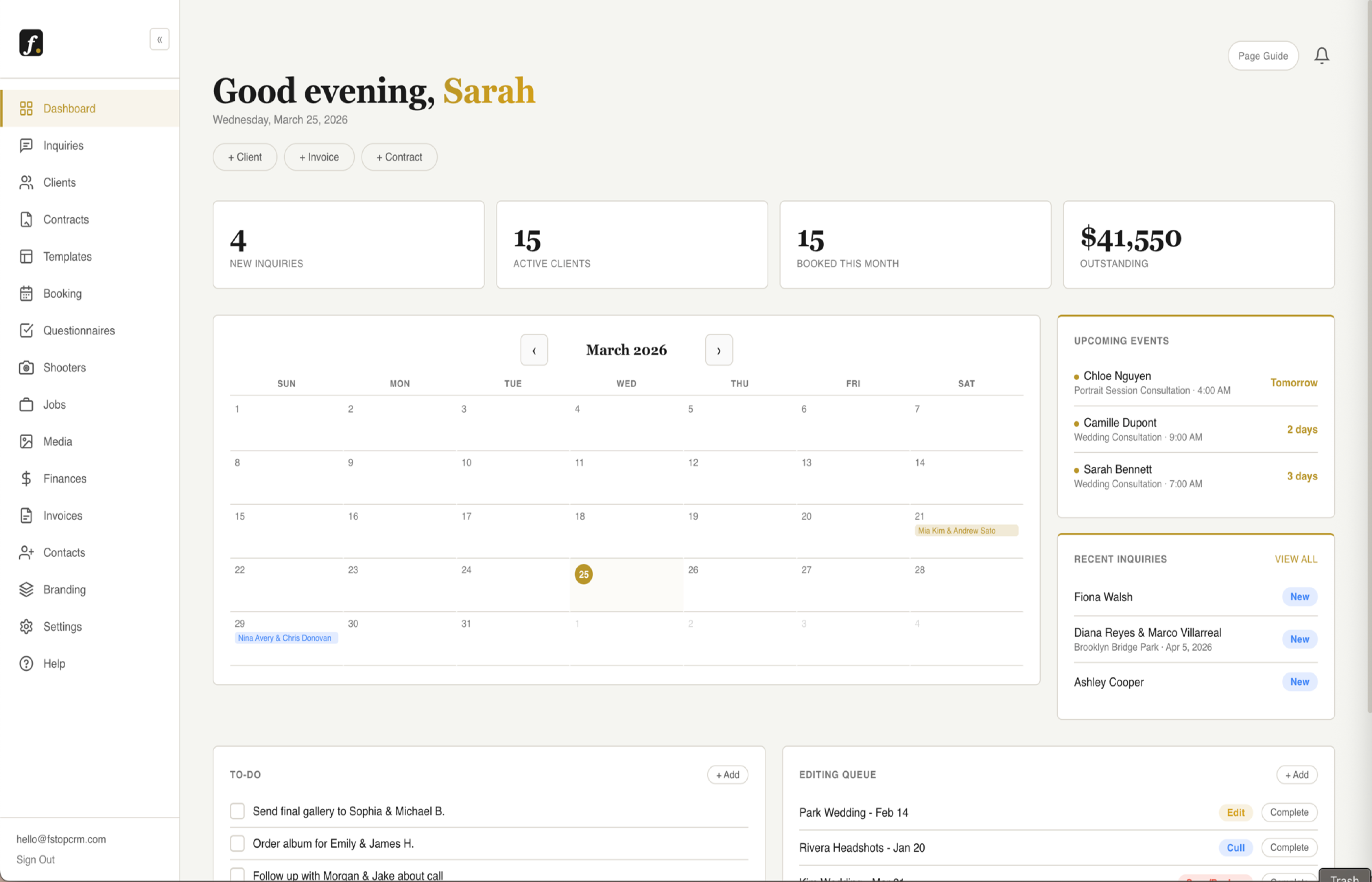
See how fstop's dashboard works →
Pixieset: Gallery Delivery with CRM Bolted On
Pixieset deserves real credit for what it does best: gallery delivery. Their photo galleries are gorgeous. Clients love the experience -- clean design, easy downloads, favorites selection, and built-in print ordering through their storefront. For photographers who rely on print sales or want a polished delivery experience, Pixieset has been the gold standard for years.
More recently, Pixieset has added a "Studio Manager" layer that includes contracts, invoicing, questionnaires, scheduling, and a basic inquiry workflow. It works, and for photographers who are already deep in the Pixieset ecosystem for gallery delivery, keeping everything in one place has obvious appeal.
But the CRM side of Pixieset still feels like what it is: an addition to a gallery platform, not the core product. The inquiry pipeline is basic. There are no auto-responses when a new lead comes in. Email templates exist but don't connect to Gmail -- everything sends from Pixieset's system. Automations are limited compared to a purpose-built CRM. And if your workflow depends on speed (responding to inquiries fast, sending contracts without friction, keeping your pipeline organized), you'll feel the edges.
Fstop CRM: Workflow-First, Built by a Photographer
Fstop CRM was built by a working wedding and portrait photographer who got tired of paying over $100/month for software that still required workarounds for basic photography workflows. It starts where your client journey starts -- the inquiry -- and follows the entire lifecycle through booking, contracts, invoicing, timelines, questionnaires, and gallery delivery.
The inquiry pipeline is the centerpiece. Leads come in, get organized by status (new, responded, consultation, booked, lost), and you can fire off templated responses within seconds of a new inquiry landing. Auto-responses go out immediately so no lead sits unanswered. Contracts use smart variables that auto-fill client details, dates, and package info -- no copy-pasting. Invoicing supports retainer plus final payment splits, which is how most photographers actually charge. And everything sends through your connected Gmail account, so clients see emails coming from you, not from a platform.
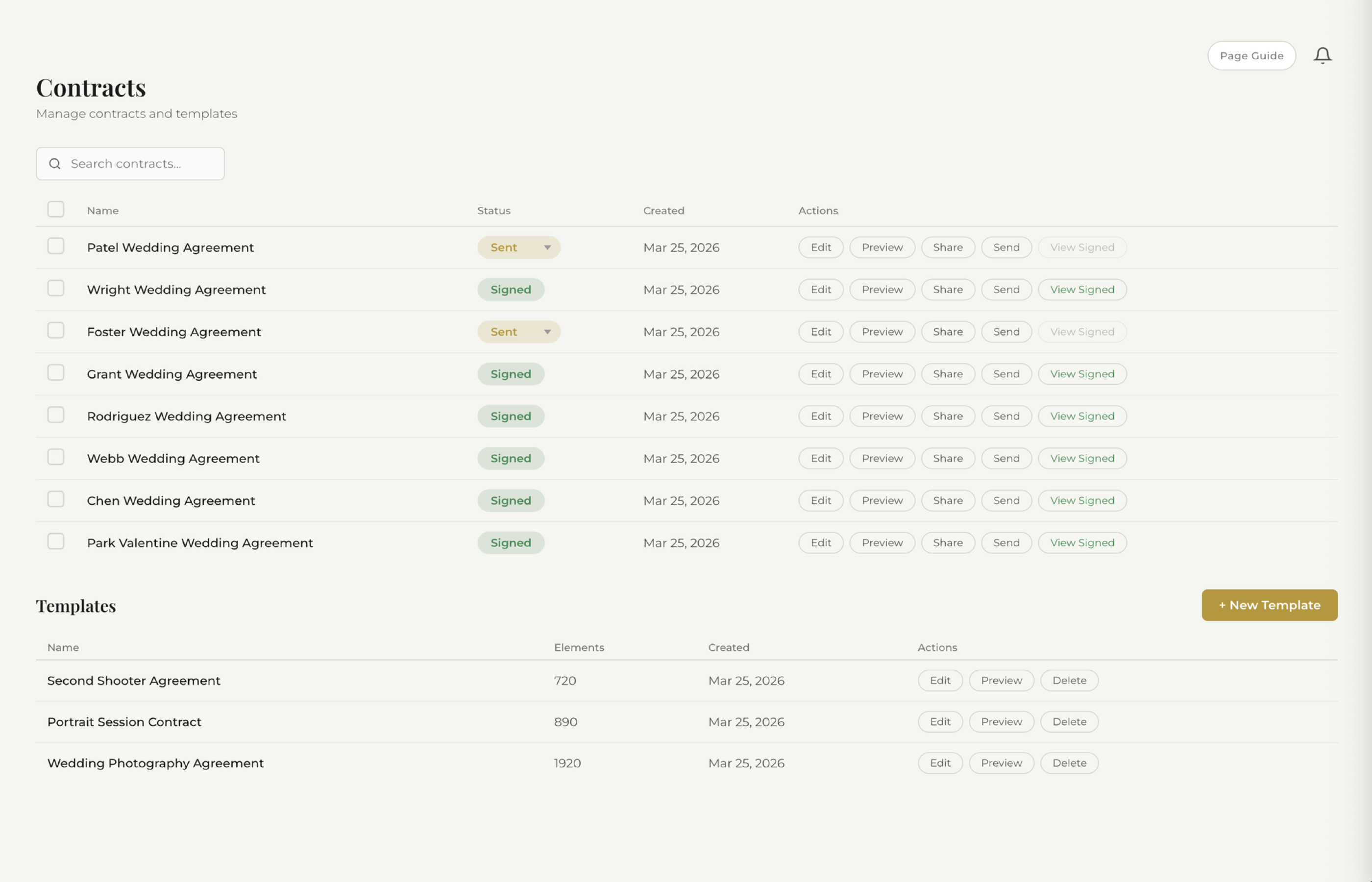
See how fstop's smart contracts work →
Day-of timelines are built in -- something that most CRMs (including Pixieset) don't offer at all. You can build a timeline for each event and share it with clients and second shooters directly from the platform. No separate Google Doc. No printing a PDF. It's native.
The form builder lets you design an embeddable contact form that matches your branding, drop it on any website (Squarespace, Wix, ShowIt, WordPress), and have inquiries flow directly into your pipeline. No Zapier required, no webhook configuration for non-technical users.
The Key Difference
Pixieset is a gallery platform that added CRM features. Fstop is a CRM built from the ground up for the photographer workflow. That distinction matters more than any individual feature.
When a tool starts as a gallery platform, the CRM features will always be secondary. They'll work, but they won't be the team's primary focus for innovation. When a tool starts as a CRM, every feature is designed around the question: "How do I move this client from inquiry to delivered as efficiently as possible?"
The question isn't which is "better" -- it's which gap in your workflow is costing you the most time and money.
Feature-by-Feature Comparison
| Feature | Pixieset | Fstop CRM |
|---|---|---|
| Gallery Delivery | ✓ (strength) | ✓ (Studio & Pro plans) |
| Inquiry Pipeline | Basic | ✓ |
| Auto-Responses | ✗ | ✓ |
| Contracts + E-sign | ✓ | ✓ |
| Smart Variables | Limited | ✓ |
| Invoicing | ✓ | ✓ |
| Email Templates | Basic | ✓ (Gmail) |
| Automations | Limited | ✓ |
| Form Builder | Basic | ✓ |
| Client Portal | ✓ | ✓ |
| Questionnaires | ✓ | ✓ |
| Day-of Timelines | ✗ | ✓ |
| Monthly Price | $0 -- $35+/mo (tiered) | From $19.99/mo |
Pricing: How the Two Stack Up
Pixieset uses a tiered pricing model. There's a free plan with limited storage, then paid tiers that unlock more gallery storage, the storefront, and Studio Manager features. To get the full CRM capabilities (contracts, invoicing, scheduling), you need to be on one of the higher tiers. Depending on your storage needs and which features you require, you could be paying anywhere from $29 to $60+ per month -- and that's just for the CRM side. If you rely on gallery delivery and need more storage, it goes higher.
Fstop CRM starts at $19.99/mo billed yearly ($21.99/mo billed monthly). Every CRM feature is on every plan: contracts, invoicing, automations, form builder, timelines, questionnaires, Gmail integration, client portal. No per-user fees, no feature gates inside the CRM. The only thing the tiers change is gallery storage: Studio at $34.99/mo (billed yearly) adds unlimited client galleries with up to 250 GB of photo storage, and Pro at $49.99/mo bumps that to 1 TB.
For photographers who want both gallery delivery and CRM functionality, the math now favors a single bill. Fstop Studio covers the full CRM plus gallery delivery for $34.99/mo, which is usually less than running a separate CRM alongside a paid Pixieset plan. If print sales are central to your business, though, pairing the two tools still makes sense. More on that in a moment.
Who Should Use Pixieset
Pixieset is the right choice if your primary need is beautiful gallery delivery and print sales. If you're a portrait photographer who earns a significant portion of your revenue from print orders, Pixieset's storefront and gallery experience is genuinely best-in-class. No CRM tool, Fstop included, matches Pixieset for online proofing and print fulfillment.
It's also a reasonable all-in-one if your business is small enough that you're handling a low volume of clients (say, under 10 bookings per year) and don't need aggressive lead management or automation. At that scale, having contracts and invoices in the same place as galleries is convenient, and the CRM limitations won't bite you as hard.
Who Should Use Fstop CRM
Fstop is the right choice if your biggest pain point is the business workflow: managing a pipeline of inquiries, responding fast, sending contracts without friction, tracking payments, coordinating day-of timelines, and keeping your entire client lifecycle organized in one place.
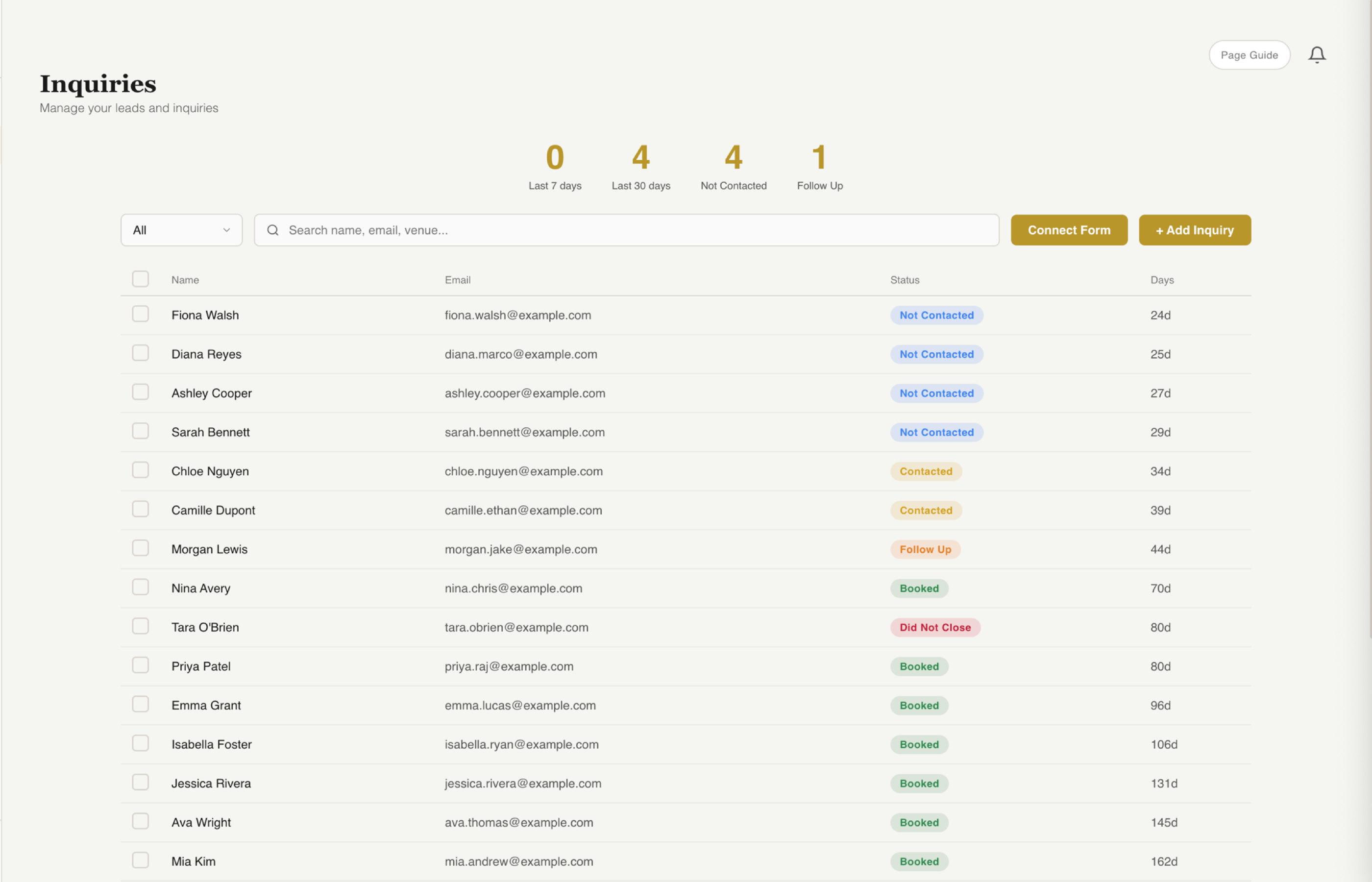
See how fstop's inquiry pipeline works →
If you're a wedding photographer booking 15+ events a year, the difference between a basic inquiry workflow and a proper pipeline with auto-responses and smart templates is measurable in dollars. Every lead that goes cold because you didn't respond within two hours is a booking you lost. Every contract that takes 20 minutes to customize by hand is 20 minutes you could have spent editing or marketing.
Fstop is also the better fit if you value sending emails from your own Gmail address rather than a platform email. Clients trust emails that come from your domain, not from "noreply@pixieset.com." That distinction matters more than people realize, especially during the booking phase when trust is everything.
Can You Use Both?
Yes. And if print sales are a real part of your revenue, it's still a smart move.
Use Pixieset for what it does best: delivering gorgeous galleries to clients, running an online print store, and handling the post-shoot delivery experience. Use Fstop CRM for everything that happens before and during the booking: lead capture, pipeline management, auto-responses, contracts, invoicing, timelines, questionnaires, and client communication.
This isn't a compromise -- it's specialization. You're using each tool for the job it was actually designed to do, rather than forcing one platform to be mediocre at everything.
The workflow looks like this: an inquiry hits your Fstop form, flows into your pipeline, you respond with a template, send a contract, collect the retainer -- all inside Fstop. After the shoot, you upload the gallery to Pixieset and send the delivery link. Two tools, zero overlap, zero friction.
Combined, you might spend $35-55/month total depending on your Pixieset plan -- which is still less than what many photographers pay for a single all-in-one tool that doesn't excel at anything. And if print sales aren't part of your business, you can skip the second tool entirely: Fstop Studio at $34.99/mo includes the full CRM plus client galleries with 250 GB of storage.
The Bottom Line
Pixieset is a gallery delivery platform that has grown into a lightweight CRM. Fstop is a CRM built from scratch for the photographer workflow, with client gallery delivery included on its Studio and Pro plans. Both are good at what they were designed to do. Neither is trying to be the other.
If you're losing clients because your galleries look bad, Pixieset is your answer. If you're losing clients because your inquiry response time is slow, your contracts take too long to send, or your workflow is held together with spreadsheets and sticky notes, Fstop is your answer. If both problems sound familiar, use both.
The only wrong choice is the one that doesn't solve the problem that's actually costing you money.
Try Fstop for 7 Days
Built by a photographer. Plans from $19.99/mo. Full CRM from inquiry to delivery, with client galleries on Studio and Pro -- no watermarks, no lock-in.
START YOUR TRIAL