Think about your last wedding booking. Between the initial inquiry and the final gallery delivery, how many emails did you exchange with that client? Twenty? Thirty? Now think about how many of those emails were the client asking the same handful of questions: "Where do I sign the contract?" "When is my next payment due?" "Can you resend the timeline?" "How do I access my gallery?"
This is the invisible tax on every photography business. You're not losing clients because your work isn't good enough. You're losing hours every week to an inbox full of questions that shouldn't need to be asked in the first place. And worse, every unanswered email — even the ones you get to eventually — creates a tiny crack in your client's confidence.
A client portal fixes this. Not partially. Almost entirely.
See how fstop's client portal works →
The Problem: Your Inbox Is Your Client's Filing Cabinet
Here's what happens without a portal. You send a contract via email. The client signs it, then buries the email. Two weeks later they need to reference a clause — maybe about travel fees or print rights — and they email you asking for it again. You dig through your sent folder, find it, forward it. That's 10 minutes gone for both of you.
Multiply that by every document in the client relationship. The invoice. The questionnaire. The shot list. The timeline. The gallery link. Each one lives in a different email thread, sent on a different date, with a different subject line. Your client's only filing system is their inbox search bar — and it fails them constantly.
The result is predictable. Clients email you for things they already have. They feel disorganized, even if they're not. And you feel like a customer service rep instead of a creative professional.
This isn't a client problem. It's a systems problem. And it has a clean solution.
What a Client Portal Actually Is
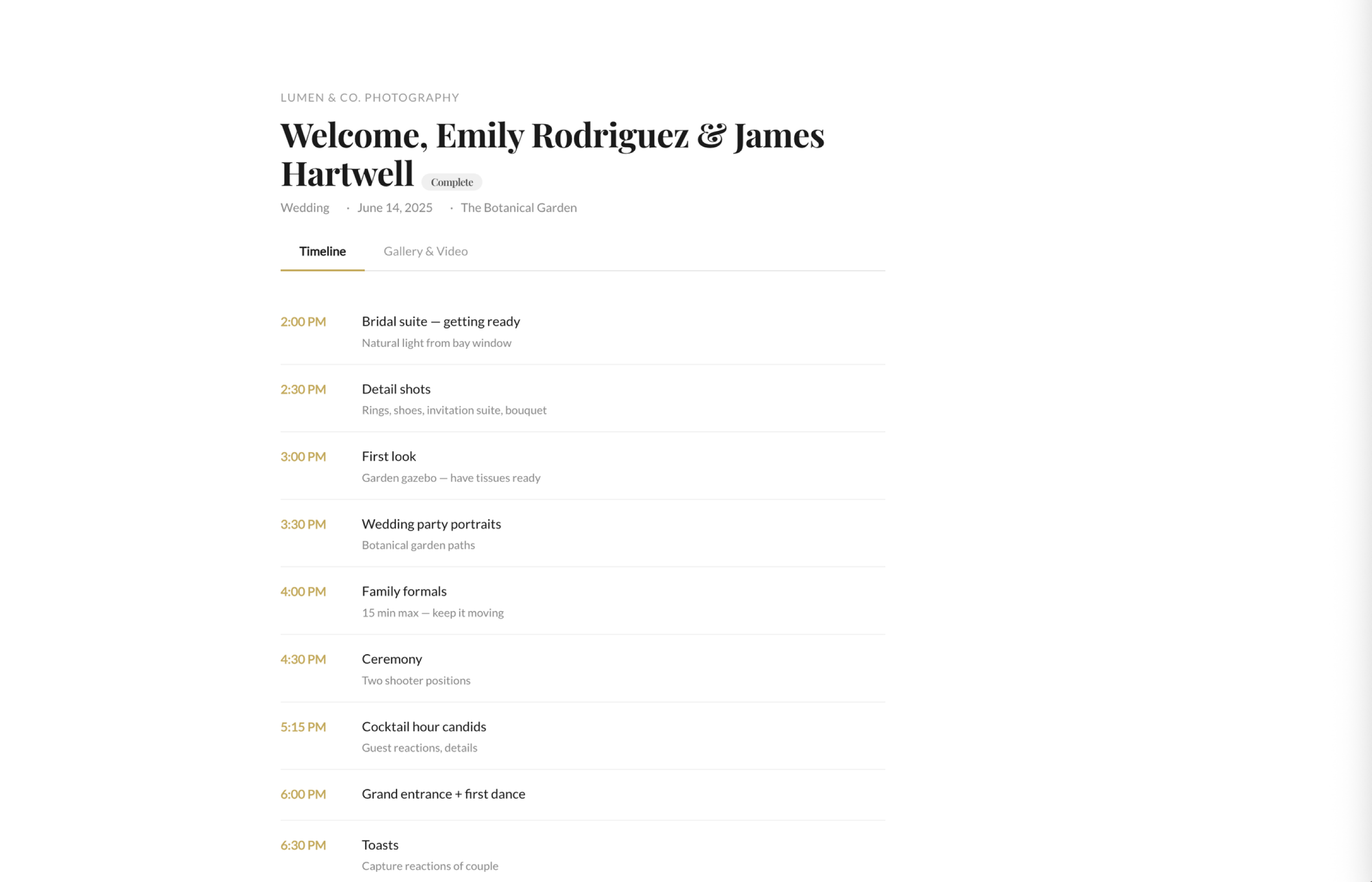
A client portal is a single, branded page where your client can access everything related to their booking. That's it. No app to download. No account to create. No password to remember. Just one link that takes them to a page with their name on it, your logo at the top, and every document they need in one place.
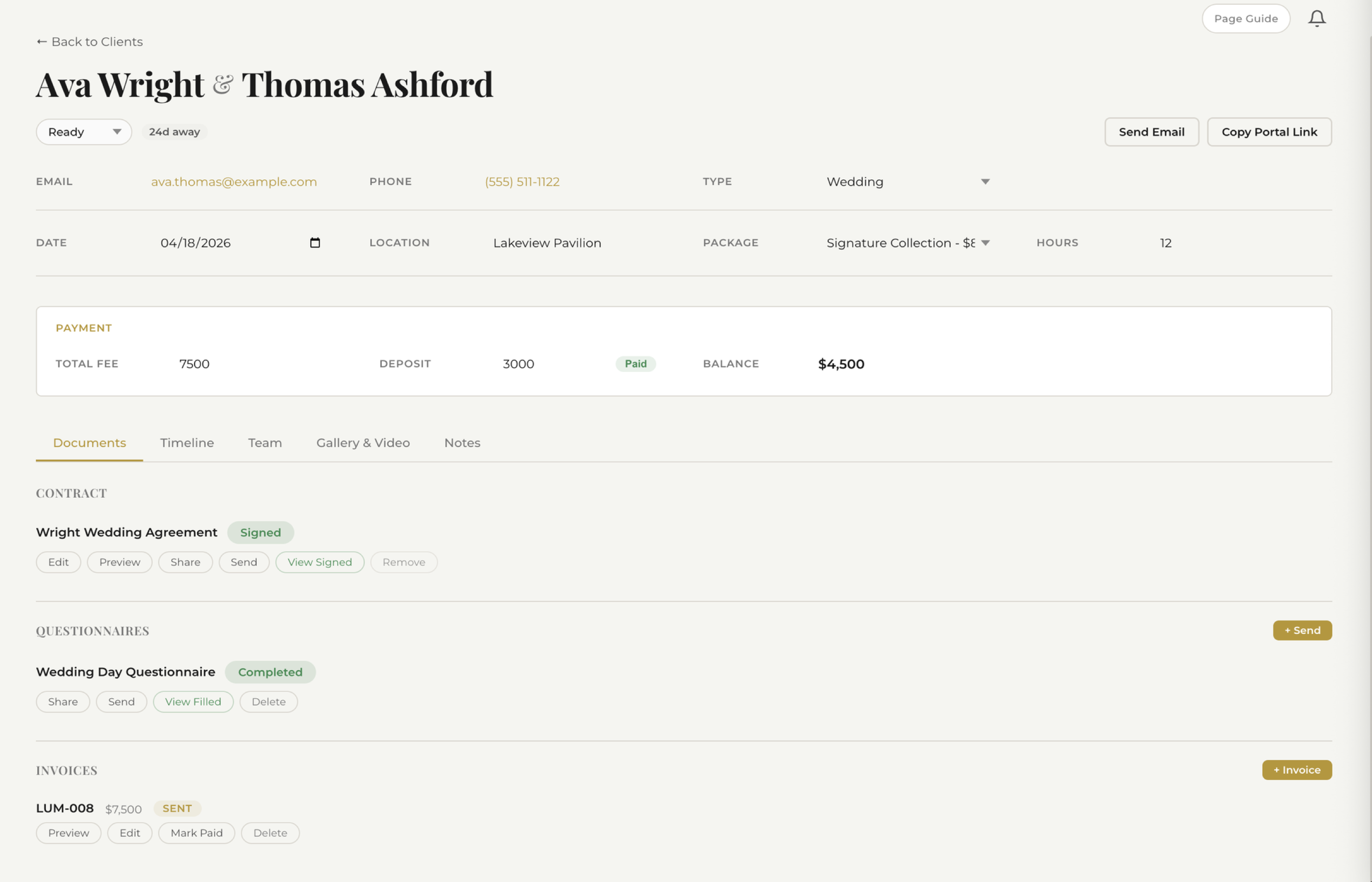
Think of it as a private dashboard for each client. When they click the link, they see:
- Their contract — signed or ready to sign, always accessible for reference
- Their invoices — with payment status, due dates, and a pay button
- Their questionnaire — the wedding day details, family groupings, vendor contacts
- Their timeline — getting-ready time, ceremony, golden hour, reception
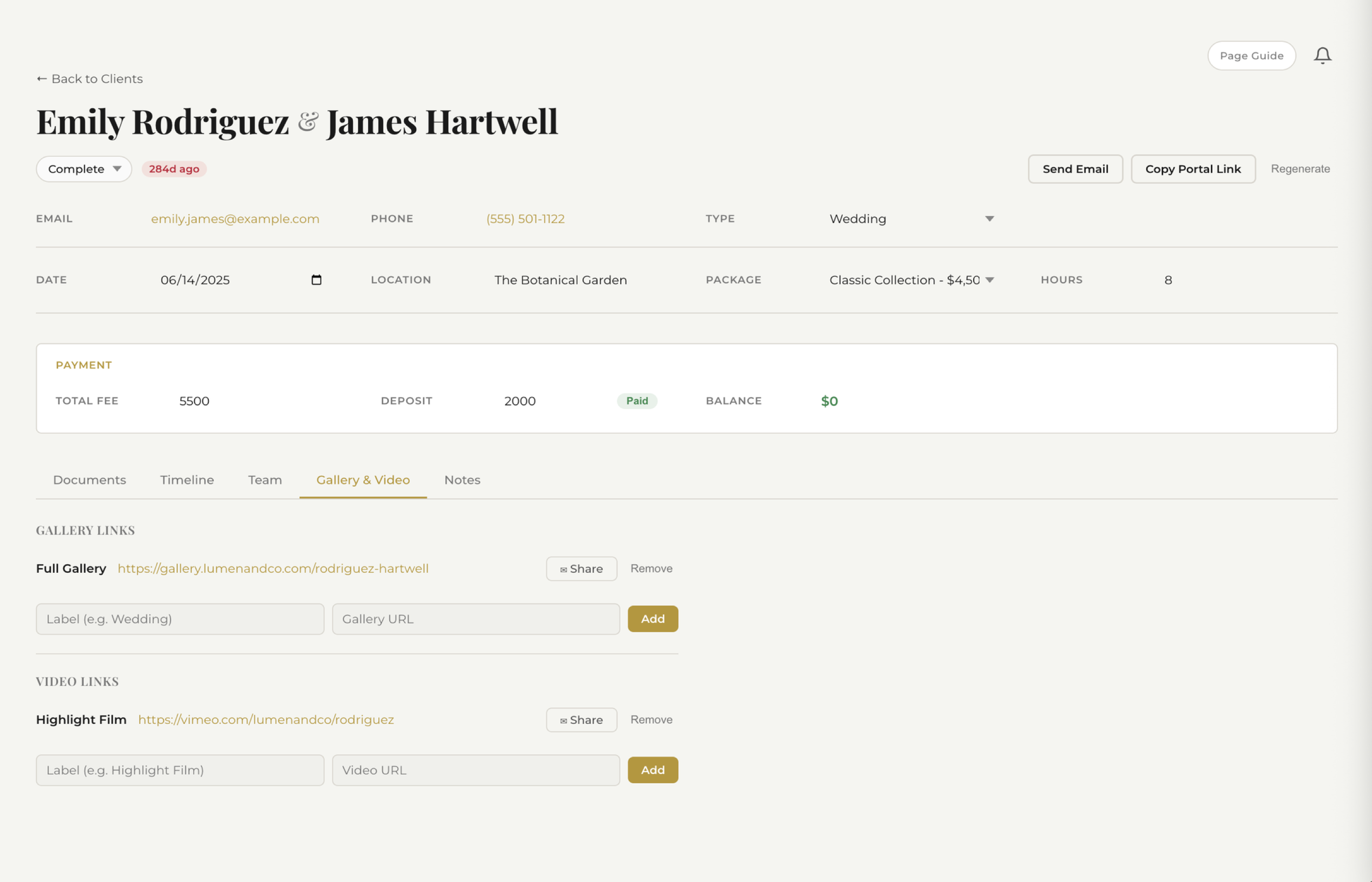
- Their gallery — delivered photos, ready to view, download, and share
Everything in one place. No digging through emails. No "can you resend that?" messages. The portal becomes the single source of truth for the entire client relationship.
How It Eliminates Email Back-and-Forth
Let's be specific about the emails a portal kills.
"Where do I sign the contract?" Gone. It's the first thing they see when they open the portal. One click to review, one click to sign.
"When is my final payment due?" Gone. The invoice is right there with the amount, due date, and payment button. No ambiguity.
"Can you resend the questionnaire?" Gone. It's sitting in the portal, partially filled out, waiting for them to finish. They can come back to it any time.
"What time do we start photos?" Gone. The timeline is in the portal. They can check it at 6am on the wedding day without texting you.
"How do I see my photos?" Gone. The gallery link is pinned right there. They can share it with family members by sharing their portal link.
Every email a client has to send you is a friction point. A client portal eliminates 90% of them.
The math is simple. If you book 25 clients a year and each one sends you 5 fewer emails because the portal answered their question first, that's 125 emails you never have to read, process, or reply to. At even 3 minutes per email, that's over 6 hours of your year returned to you. And that's a conservative estimate — many photographers report the reduction is much higher.
See how fstop organizes client documents →
The Professionalism Factor
Here's something photographers don't talk about enough: your client experience is part of your brand. The couple who just paid you $4,000 for wedding photography is comparing their experience with you to every other vendor they're working with. The planner has a portal. The venue has a planning app. The florist sends mood boards through a shared workspace.
And then there's the photographer who sends contracts as email attachments and invoices as PDF links scattered across six different threads.
A client portal immediately puts you in a different category. When a bride opens a branded page with her name, her wedding date, and every document organized in one place, the unspoken message is clear: this photographer has their business together. That confidence translates directly into trust — trust that the photos will be delivered on time, that the day-of logistics will be handled, that they made the right choice.
It's not about being flashy. It's about being organized in a way your client can see and feel. The portal is proof that you run a real business, not a side hustle with a good Instagram feed.
No Login Required — Magic Link Access
The biggest objection photographers have to client portals is that clients won't use them. "My clients can barely find their email — they're not going to create an account and remember a password."
Fair point. That's why modern portals don't work that way.
Fstop uses magic link access. When a client needs to reach their portal, they receive a secure, unique link — no username, no password, no account creation. They click the link and they're in. It works on their phone, their laptop, their tablet. There's zero friction between the client and their documents.
This matters more than it sounds. Every login screen is a barrier. Every "forgot password" flow is a moment where a client gives up and just emails you instead. Magic links remove that entire failure mode. The client clicks, they're in, they find what they need, they're done. No support ticket. No frustrated email. No interruption to your editing session.
Fstop's Portal vs. the Competition
Other platforms offer client portals, but the experience varies dramatically.
HoneyBook
HoneyBook has a client-facing view, but customization is limited. Your branding options are constrained to their template system, and the portal often feels more like HoneyBook's product than your business. Clients see HoneyBook's interface design, HoneyBook's layout choices, and HoneyBook's branding cues before they see yours. For a premium photographer charging $3,000+, that's a mismatch.
Dubsado
Dubsado's client portal is powerful — in theory. In practice, it requires significant setup time to get it working and looking the way you want. The customization is there, but it's buried behind layers of configuration. Many photographers report spending hours building workflows before their portal feels complete. If you enjoy that kind of setup work, Dubsado rewards it. If you want something that works out of the box, it's a steep climb.
Fstop CRM
Fstop's portal is designed with one principle: it should feel like your brand, not ours. Your logo, your colors, your business name — front and center. The portal auto-populates with the client's contract, invoices, questionnaire, timeline, and gallery as you create them. There's nothing to configure on a per-client basis. You do your normal workflow — send a contract, create an invoice, build a timeline — and the portal fills itself in. The client always has a current, complete view of their booking.
Setup time: zero. It works the moment you book your first client.
See how fstop handles gallery delivery →
The Referral Effect
Here's the part most photographers miss entirely. A client portal isn't just a tool for your current client. It's a referral engine.
When your bride shares her gallery with her maid of honor — who's getting engaged next month — she's sharing a link to a beautifully branded page with your logo on it. That maid of honor doesn't just see the photos. She sees the experience. She sees a photographer who has a professional system, a clean interface, and a business that clearly runs smoothly.
That impression does more than any Instagram post. It's word-of-mouth backed by tangible proof. "You have to hire my photographer — look at this." And "this" isn't just a gallery of images. It's a portal that signals you're the kind of photographer who has everything together.
Every client who accesses their portal becomes an inadvertent ambassador for your brand. The portal page carries your branding into rooms you'll never be in — group chats, planning spreadsheets, family email threads. You can't buy that kind of exposure. But you can build a system that creates it automatically.
The Bottom Line
A client portal isn't a luxury feature. It's the difference between running a photography business and just taking photos for money. It reduces your email volume, elevates your professionalism, eliminates client confusion, and turns every booking into a potential referral source.
If you're still managing client communication through scattered email threads and shared Google Drive folders, you're working harder than you need to — and giving your clients a worse experience than they deserve.
One link. One page. Everything they need. That's what a portal does.
Try Fstop for 7 Days
Client portals included from day one. Plans from $19.99/mo. No setup required — it just works.
START YOUR TRIAL