Here's a number that should bother you: the average solo photographer spends more than three hours a day on email. Not editing. Not shooting. Not marketing. Just email — responding to inquiries, sending follow-ups, chasing invoices, confirming timelines, and typing "Thanks so much for reaching out!" for the four hundredth time.
Three hours a day, five days a week, fifty weeks a year. That's 750 hours. Roughly nineteen full work weeks spent copying and pasting the same messages into slightly different threads.
Automation can give most of that time back. But here's the thing photographers worry about — and rightly so: your business runs on relationships. Clients hire you because they trust you, not because you have the fastest autoresponder. So the question isn't whether to automate. It's what to automate and what to keep human.
Get it right, and you respond faster, follow up more consistently, and never forget a payment reminder again — all while your clients feel like they're getting more personal attention, not less.
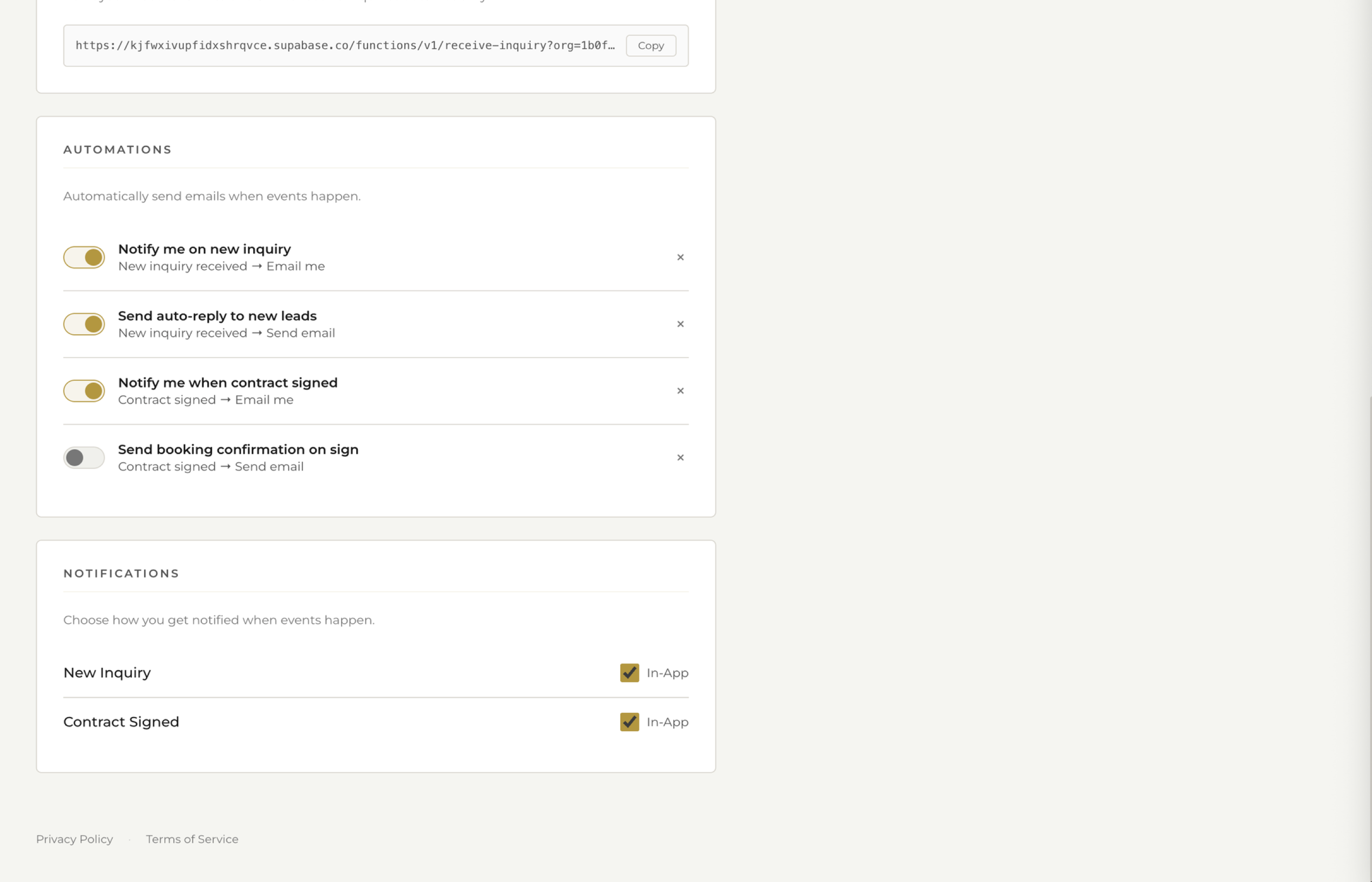
See how fstop's automations work →
The Admin Problem Is Bigger Than You Think
Most photographers don't realize how much time they lose to repetitive communication because it happens in small chunks. Five minutes here to respond to an inquiry. Ten minutes there to draft a follow-up. Another five to send a payment reminder. None of it feels like a lot in the moment.
But multiply it across 20 or 30 active clients and it adds up fast. The real damage isn't even the time — it's the context switching. Every time you stop editing to send an email, it takes 15 to 20 minutes to get back into a creative flow state. Those "quick" admin tasks are costing you far more than the minutes on the clock.
And there's a second, quieter cost: the things that slip through the cracks. The inquiry you meant to follow up on but forgot about for five days. The payment reminder you kept putting off because it felt awkward. The welcome email you never got around to writing. These small gaps erode your professionalism and cost you bookings.
The Five Things You Should Automate
Not everything in your business should be automated. But these five things? They're the same every single time. They don't require creative judgment. And they have an outsized impact on whether a lead becomes a booked client.
1. Inquiry Auto-Responses
When someone fills out your contact form, the clock starts ticking. Research consistently shows that leads contacted within the first hour are dramatically more likely to book than those who wait a day or more. But you can't be at your computer 24/7 — you're often at a shoot, in the car, or asleep.
An automated inquiry response solves this instantly. It acknowledges the inquiry, sets expectations for when you'll follow up personally, and makes the potential client feel seen. Something like: "Thank you for reaching out! I'd love to learn more about your [event type]. I'll review your details and get back to you within 24 hours with availability and pricing."
That's it. You're not trying to close the deal with an autoresponder. You're just buying yourself time while making a great first impression.
2. Follow-Ups After 48 Hours
You sent a proposal or pricing info and heard nothing back. It happens constantly. The client got busy, forgot, or is comparing you with two other photographers. A gentle follow-up at the 48-hour mark — "Just wanted to make sure this landed in your inbox! Happy to answer any questions" — is often all it takes to re-engage them.
Most photographers either forget to follow up or feel awkward doing it manually. Automating this removes both problems. The follow-up goes out on time, every time, without you having to think about it.
3. Payment Reminders
Chasing payments is the least enjoyable part of running a photography business. It feels uncomfortable to ask people for money, so many photographers let invoices sit unpaid for weeks. An automated payment reminder at 7 days, 14 days, and 30 days past due is polite, professional, and takes the emotion out of it entirely.
The message comes from your CRM, not from "you personally nagging them." Clients actually prefer this — it's a clean reminder without any awkwardness.
4. Welcome Sequences
The moment a client signs their contract and pays their retainer, they should feel like something just started. A welcome sequence — a short series of two or three emails over the first week — sets the tone for your entire working relationship. It might include a congratulations message, a link to their client portal, a "what to expect next" timeline, and a questionnaire to gather details about their event.
This sequence is the same for every client. The details change (names, dates, event type), but the structure and purpose are identical. Automate it once, and every new client gets a polished onboarding experience without you lifting a finger.
5. Review Requests
After gallery delivery, there's a golden window — usually about a week — when clients are at peak excitement about their photos. That's when you want to ask for a Google review or testimonial. Wait too long and the moment passes. Ask too early and they haven't processed the images yet.
An automated email timed to go out 7 days after gallery delivery hits that window perfectly every time. Include a direct link to your Google Business review page to make it as frictionless as possible.
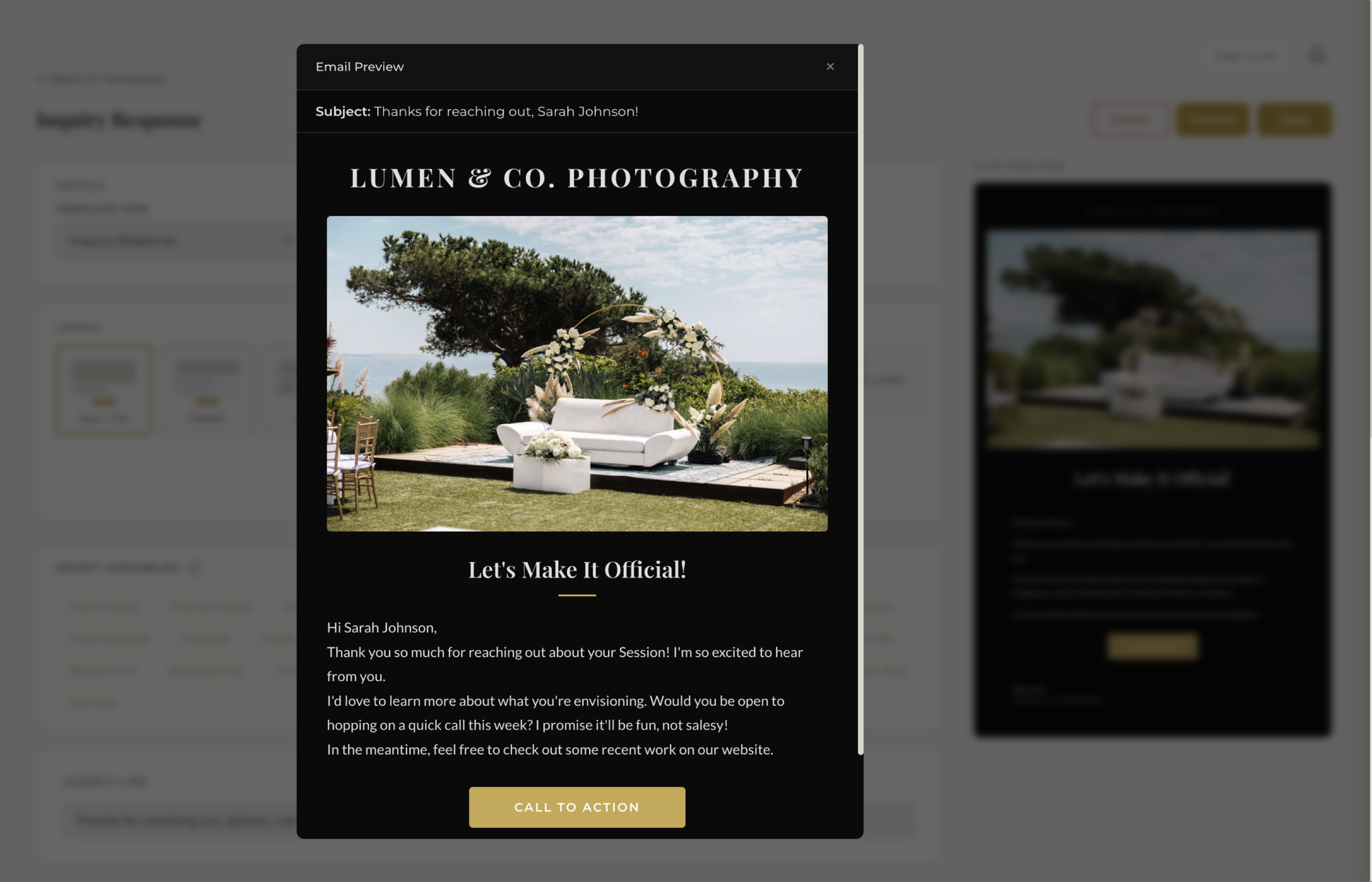
See how fstop's email templates work →
What You Should Never Automate
Automation is a tool, not a philosophy. Some parts of your business need to stay human — and trying to automate them will backfire.
Custom Pricing Conversations
Every client's needs are slightly different. A couple booking an elopement on a Tuesday has different requirements than a 300-guest Saturday wedding. Pricing conversations require listening, understanding, and tailoring your offer. Send a generic automated price list and you'll lose the leads who needed a little more nuance.
Day-Of Communication
On the wedding day or the day of a portrait session, your clients need to know a real human is on the other end of the phone. Timeline changes, weather plans, vendor coordination — all of this needs to be live, responsive, and personal. Never automate anything on shoot day.
Gallery Curation and Delivery
The gallery is your product. The way you sequence images, the sneak peeks you choose, the personal note you write when delivering — that's your art extending beyond the camera. An automated "your gallery is ready" email is fine, but the curation itself should always be a hands-on creative decision.
Conflict Resolution
If a client is unhappy, confused, or frustrated, they need to hear from you — not a template. Any time there's tension or miscommunication, step away from your automations and handle it directly. These moments define your reputation more than anything else.
You don't need to automate everything. Just automate the things you type the same way every single time.
How to Set It Up in Fstop
The whole point of automation is that it should be easy to set up and then invisible. In Fstop CRM, the system is built around two concepts: triggers and templates.
A trigger is the event that starts the automation. "New inquiry received." "Contract signed." "Invoice past due by 7 days." "Gallery delivered." You pick the moment.
A template is the email that gets sent. You write it once using merge tags — {client_name}, {event_date}, {package_name} — so it feels personal even though it's automated. The email sends from your connected Gmail account, so it shows up in the client's inbox as coming from you, not from some third-party tool.
Here's what a basic automation setup looks like:
- Create your template. Go to Email Templates and write your inquiry auto-response. Use merge tags for the client's name and event type. Keep it warm but brief.
- Set the trigger. Choose "New Inquiry" as the trigger event. The email will fire automatically whenever someone submits your contact form.
- Test it. Submit a test inquiry through your own form. You should see the auto-response land in your inbox within seconds.
- Repeat for other workflows. Follow-up at 48 hours. Payment reminder at 7 days. Welcome email on contract signing. Review request after gallery delivery.
The entire setup takes about 30 minutes. After that, it runs silently in the background forever.
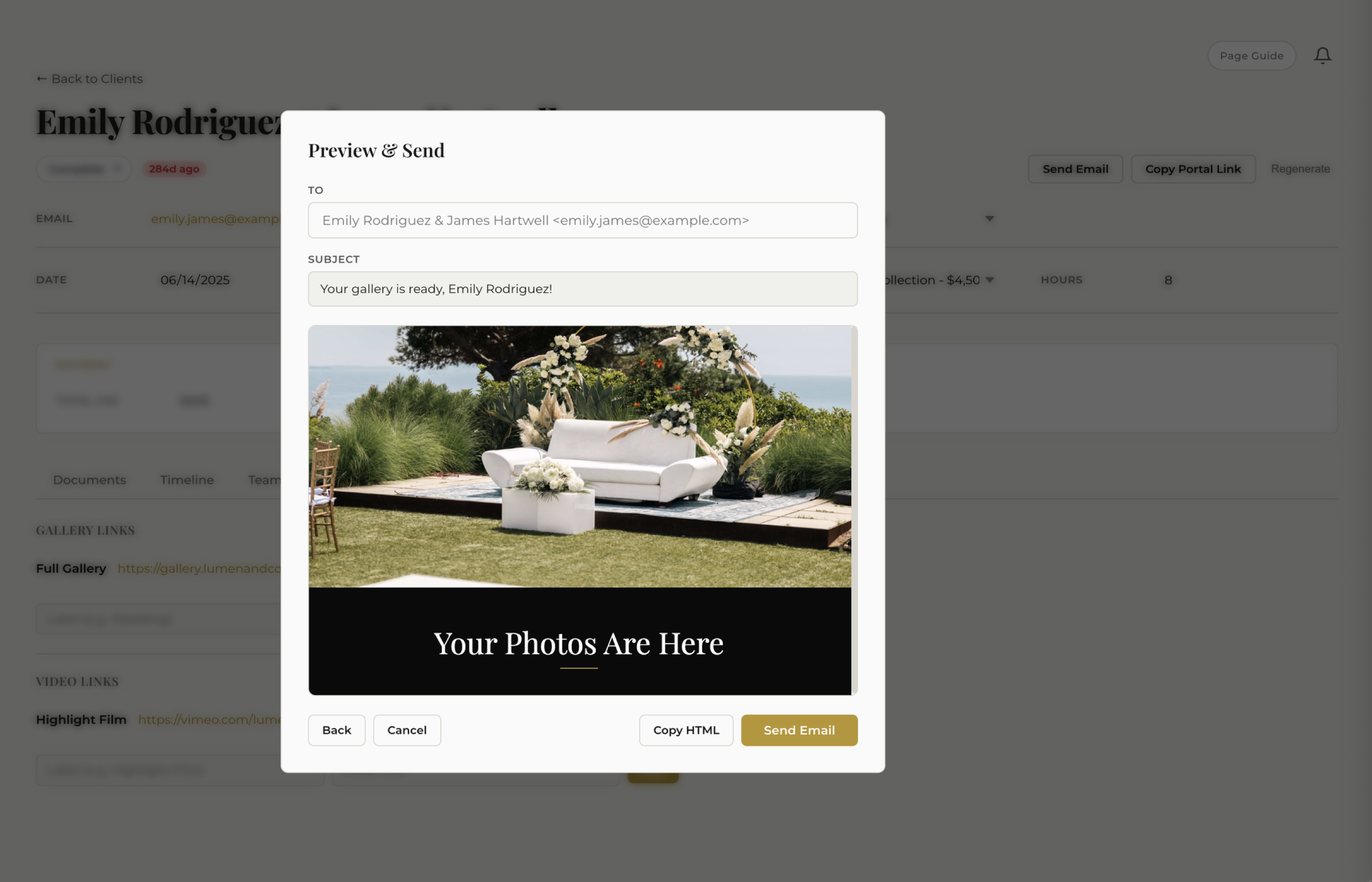
See how fstop's email sending works →
The Compound Effect: Small Automations, Massive Results
Here's where it gets interesting. Each individual automation saves you a few minutes per client. But when you stack five automations across 30 active clients in a season, the numbers compound fast.
Let's say each automation saves you an average of one email per client. Five automations across 30 clients is 150 emails you didn't have to write. At an average of 5 minutes per email (including finding the thread, drafting, reviewing, and sending), that's 12.5 hours saved per season — just from the automations themselves.
But the real savings come from what you don't lose. The inquiry that would have gone cold because you were at a Saturday shoot and couldn't respond until Monday. The follow-up that would have slipped through the cracks during your busiest month. The payment that would have gone unpaid for six weeks because you kept putting off the awkward conversation.
Automation doesn't just save time. It makes you more reliable, more professional, and more profitable — without requiring more effort.
Start Small: Your First Automation
If you're new to automation, don't try to set up all five workflows at once. Start with the one that has the highest impact and the lowest risk: the inquiry auto-response.
Here's why it's the best place to begin:
- Highest ROI. Speed-to-lead is the single biggest factor in converting inquiries to bookings. An instant response beats a thoughtful response sent 48 hours later.
- Lowest risk. You're not making promises or quoting prices. You're just acknowledging receipt and setting expectations. Even if the wording isn't perfect, it's better than silence.
- Builds confidence. Once you see it working — inquiries getting acknowledged instantly while you're out shooting — you'll trust the system enough to add more automations.
Set up your inquiry auto-response today. Let it run for a week. Watch what happens to your response rate and lead engagement. Then add the 48-hour follow-up. Then the welcome sequence. Layer them on one at a time, and within a month you'll have a system that handles the bulk of your repetitive communication without you ever touching it.
The Goal Isn't Less Communication — It's Better Communication
The photographers who resist automation usually share the same fear: "I don't want my clients to feel like they're talking to a robot." That's a valid concern. But the irony is that most clients of non-automated photographers already feel neglected — because the photographer is so buried in admin that responses come late, follow-ups get forgotten, and the experience feels disorganized.
Automation, done right, creates the opposite effect. Every client gets a prompt, warm acknowledgment. Every follow-up arrives on time. Every new booking starts with a polished welcome sequence. The experience feels more personal, not less — because the automated parts handle the logistics so that when you do show up personally (for pricing conversations, shoot-day communication, gallery delivery notes), you're fully present instead of frazzled.
You don't need to automate your whole business. You just need to automate the parts that are the same every time, so you can bring your full attention to the parts that aren't.
Try Fstop for 7 Days
Set up your first automation in minutes. Plans from $19.99/mo. No contracts, no watermarks, no fluff.
START YOUR TRIAL