You became a photographer to create images, not to spend your evenings typing the same email for the forty-seventh time. Yet here you are, copy-pasting paragraphs between threads, swapping out client names, double-checking you didn't accidentally send someone else's wedding date.
Email is the backbone of your client communication. From the moment someone fills out your contact form to the moment they leave you a glowing review, nearly every touchpoint runs through your inbox. And most of those emails follow the same structure, every single time.
That's exactly why templates exist. Not the generic, corporate kind that make you sound like a chatbot. Real templates that sound like you, structured for the moments that matter, and pre-loaded with the details that change from client to client.
The average photographer spends 5+ hours a week on email. Templates cut that to minutes.
Here are the five emails that every photographer should have saved as templates, ready to fire at the click of a button.
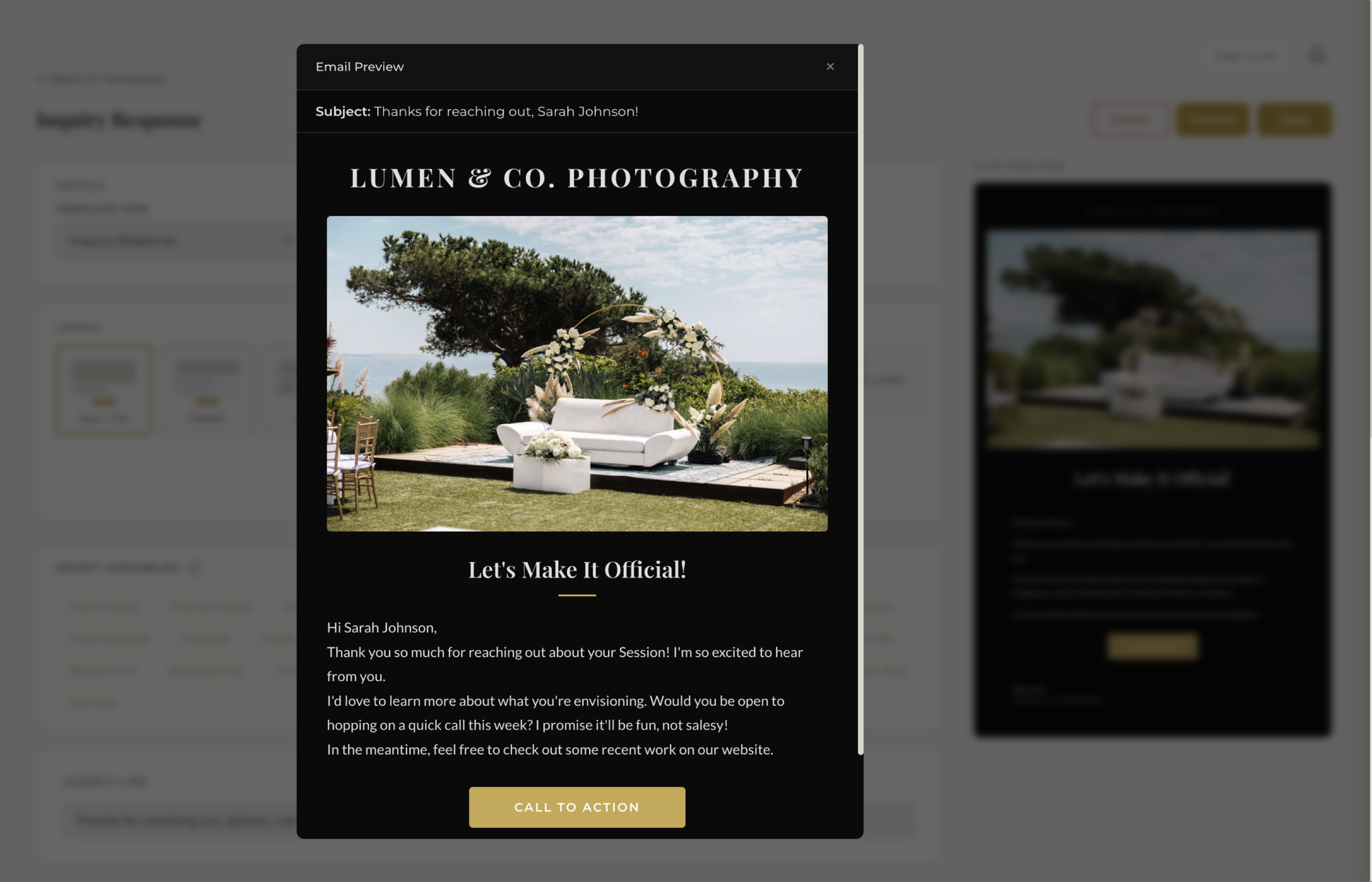
See how fstop's email templates work →
1. The Initial Inquiry Response
Why it matters
Speed wins bookings. According to research across service industries, the first business to respond to an inquiry is 78% more likely to win the deal. In wedding photography, where couples send inquiries to three or four photographers at once, a fast, warm reply can be the difference between getting booked and getting ghosted.
But speed doesn't mean sloppy. Your initial response needs to feel personal, professional, and genuinely excited about their event. It should acknowledge the specific details they shared, point them toward next steps, and make them feel like you actually read their message — not like they triggered an autoresponder.
What to include
- A warm greeting using their first name — not "Dear Sir/Madam"
- A reference to their event details — date, venue, or event type
- A brief intro to you and your approach — one or two sentences, not your life story
- A clear call to action — a link to book a call, a pricing guide, or a question to keep the conversation going
The key is that this template should feel personal even though it's pre-written. In Fstop, smart variables like {{client_first_name}}, {{event_date}}, and {{event_type}} auto-fill from the inquiry data. So when you hit send, the email reads: "Hi Sarah, I'm so excited you're looking for a photographer for your October 18th wedding!" — not "Hi [NAME], thank you for your inquiry about [EVENT]."
That's the difference between a template that saves you time and one that loses you trust.
2. The Booking Confirmation
Why it matters
The contract is signed. The retainer is paid. Your client just made a significant financial commitment to you. This is one of the most emotionally charged moments in the entire client journey, and what they receive next sets the tone for the entire relationship.
A strong booking confirmation email does three things: it validates their decision, it removes uncertainty about what happens next, and it makes them feel like they're in good hands. A weak one — or worse, no confirmation at all — leaves them wondering if the payment even went through.
What to include
- Congratulations and genuine excitement — mirror their energy
- Confirmation of the key details — date, package, and amount paid
- What happens next — when they'll hear from you again, what to expect leading up to the event
- Any immediate action items — questionnaire to fill out, planning guide to review
- Your contact info — remind them how to reach you
In Fstop, variables like {{package_name}}, {{total_amount}}, and {{event_date}} pull directly from the signed contract and invoice data. The template writes itself. You click send, and your client gets a polished, detailed confirmation in under 30 seconds.
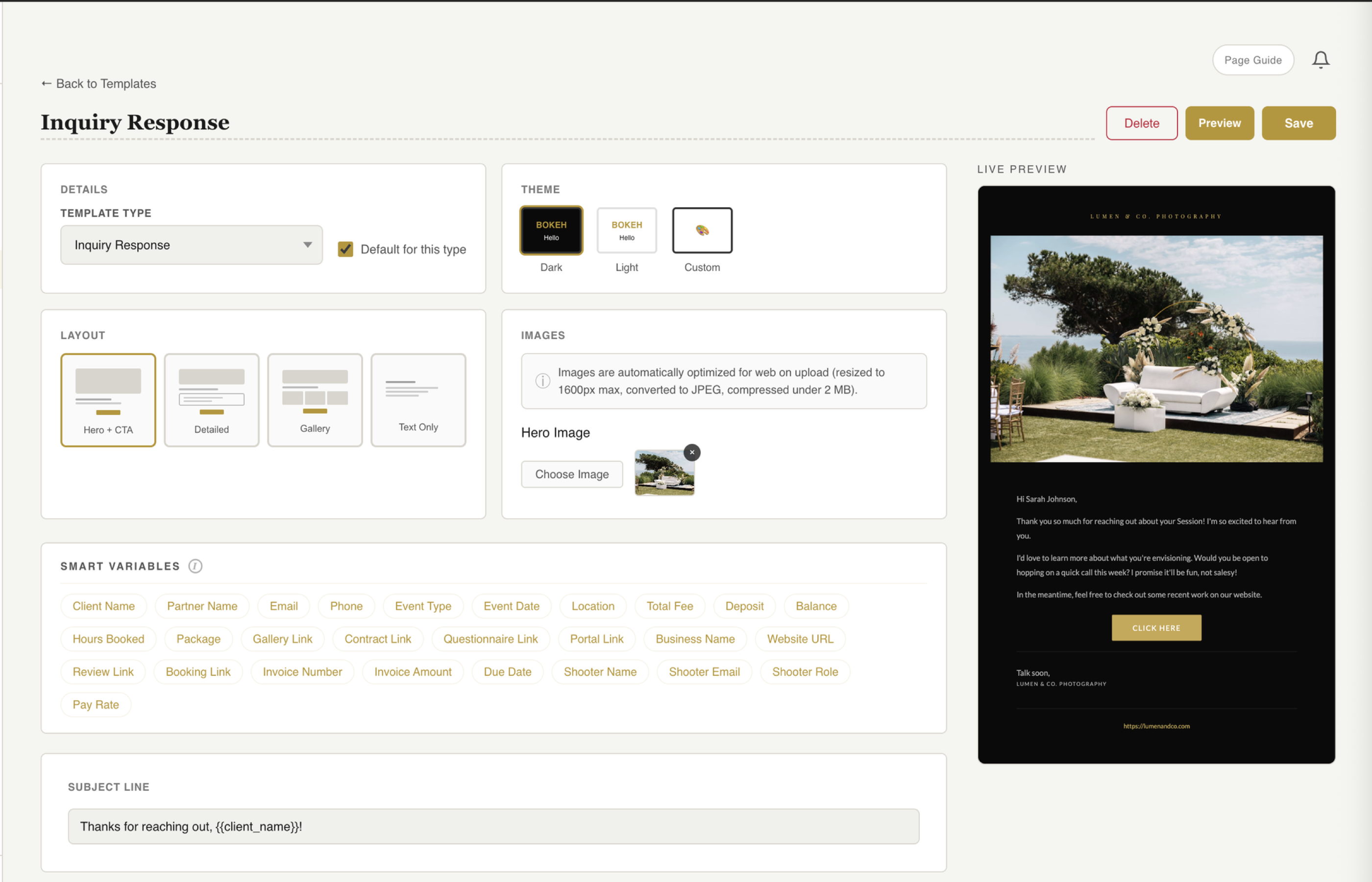
See the fstop email editor in action →
3. The Pre-Shoot Details Email
Why it matters
One to two weeks before the shoot is when anxiety peaks — for both you and the client. They're wondering if you remember, if the timeline is finalized, if you know where to park. You're hoping they haven't changed the schedule without telling you.
A pre-shoot details email eliminates that anxiety on both sides. It proves you're organized. It surfaces any last-minute changes while there's still time to adjust. And it gives your client a single reference point they can check on the day of instead of digging through a thread from four months ago.
What to include
- Date, time, and location confirmation — include the full address, not just the venue name
- Timeline overview — key moments and approximate times
- What to expect from you — arrival time, what you'll be wearing, your second shooter info
- What you need from them — final headcount, family group shot list, day-of contact person
- A reminder about the final payment — if it's due before the event, mention the amount and deadline
This is where smart variables really shine. Fstop can auto-fill {{event_date}}, {{event_location}}, {{remaining_balance}}, and {{payment_due_date}} so your pre-shoot email is specific and accurate without you manually cross-referencing invoices, contracts, and chat threads.
4. The Gallery Delivery Email
Why it matters
This is the email your client has been waiting for. They've been counting down the weeks since the shoot. Their mom has been texting them asking if the photos are ready yet. When that gallery link lands in their inbox, it's genuinely one of the highlights of the entire experience.
Don't waste it with a one-liner that says "Here are your photos." This email is a moment. Use it.
A great gallery delivery email does the emotional work that turns a satisfied client into an ecstatic one. It builds anticipation in the first few sentences. It tells them what to expect. And it quietly sets the stage for the next ask — the review, the referral, the album order.
What to include
- An opening that reflects the experience — reference something specific from the shoot if you can
- The gallery link, front and center — don't bury it under three paragraphs
- How to download — brief instructions so they don't have to figure it out
- Sharing permissions — can they share publicly? Do you want a tag or credit?
- What's next — album design, print options, or just a warm sign-off
In Fstop, the gallery delivery template can include {{client_first_name}} and {{gallery_link}}, so the moment you're done editing, you select the template, the client's details fill in, and the email goes out through your connected Gmail — not from some no-reply address they don't recognize.
5. The Review Request
Why it matters
Google reviews are the single most underutilized growth tool for photographers. A photographer with 40+ five-star reviews on Google will outrank someone with better work and a bigger Instagram following in local search results. When a couple searches "wedding photographer near me," Google's local pack shows businesses with reviews first. Full stop.
But photographers almost never ask. It feels awkward. You don't want to seem pushy right after delivering the gallery. So you tell yourself you'll send the request later, and later never comes.
Templating the review request removes the friction entirely. You send the gallery. You wait a few days for the excitement to settle in. Then you send the review request — warm, personal, and with a direct link to your Google Business listing so they don't have to search for it.
What to include
- A genuine thank-you — remind them how much you enjoyed the experience
- A simple, specific ask — "If you have two minutes, a Google review would mean the world to me"
- A direct link to your Google review page — don't make them search for you
- No pressure — keep it short and sincere, not transactional
Timing matters. Send this three to five days after gallery delivery — long enough for them to have looked through the photos and shared a few favorites, short enough that the excitement is still fresh. In Fstop, you can queue this template as a follow-up so it's part of your natural workflow, not something you have to remember to do manually.
The Power of Smart Variables
Templates only work if they don't sound templated. That's where smart variables change the game.
Instead of placeholders that you manually replace — and occasionally forget, sending "Hi {{first_name}}" to an actual client — Fstop's smart variables pull live data from your CRM. Client name, event date, venue, package, payment amounts, gallery links. Every detail fills in automatically when you select a template.

Learn more about smart variables →
This means you can write a template once — in your voice, with your personality — and use it hundreds of times without it ever feeling generic. Your clients don't know it's a template. They just know you're responsive, organized, and thoughtful.
And because Fstop sends through your connected Gmail account, every email comes from your actual email address. Clients reply directly to you. There's no third-party "sent via" branding in the footer. It's just you, talking to your client, in a fraction of the time.
Stop Typing the Same Email Twice
These five templates cover the core arc of every client relationship: first contact, commitment, preparation, delivery, and follow-up. Together, they handle roughly 80% of the emails you'll send in a typical booking cycle.
That's not an exaggeration. Think about how many times you've written a version of "Hi [name], I'm so excited about your upcoming wedding!" or "Your gallery is ready!" The words change slightly each time, but the structure is identical. You're doing creative work with the efficiency of manual labor.
Build these five templates once. Refine them until they sound exactly like you. Load them into your CRM. And then reclaim those five-plus hours a week for the work that actually moves your business forward — shooting, editing, marketing, or just not working at 10 PM.
Your inbox doesn't have to be the hardest part of running a photography business.